

JL Apps
Texlet app icon

Math & science · for iPhone, iPad

Texlet: LaTeX Editor

Math, formulas & documents

Write formulas in LaTeX and see them typeset right away. Texlet opens in an instant – no account, no setup, no internet needed. For homework, lecture notes, slides, theses and every equation that should look good.

Download on the App Store

Free · In-app purchases

Texlet

Features

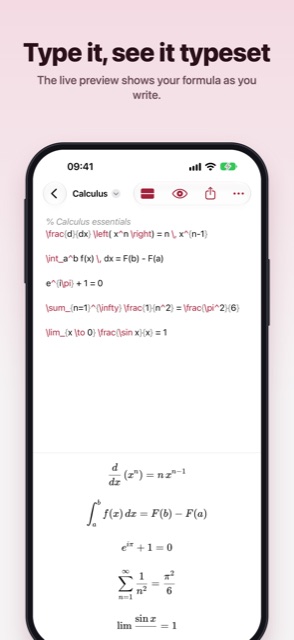
TYPE IT, SEE IT TYPESET

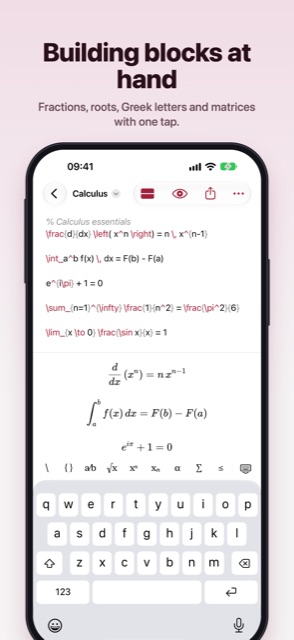
The live preview shows your formula as you write – right below it on iPhone, next to it on iPad, and on iPhone Duo half open, right on the other half. Or view it full screen, free of distractions. Fractions, integrals, sums, matrices, cases and chemistry with \ce are typeset cleanly, even offline.


BUILDING BLOCKS AT HAND

  • Above the keyboard: fraction, root, superscript and subscript, Greek letters, sums and integrals, relations, arrows, brackets, matrices and environments
  • Brackets close themselves
  • Return after \begin{…} adds the matching \end{…}, and lists continue with the next \item
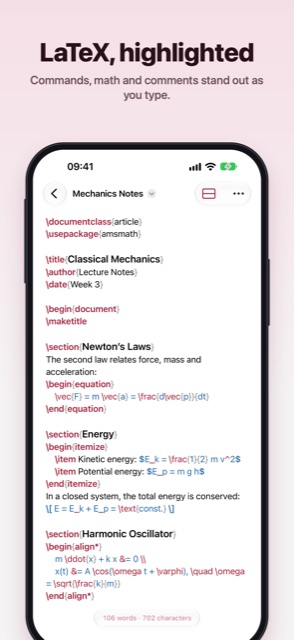
  • Syntax highlighting for commands, math, environments and comments

WHOLE DOCUMENTS, TOO

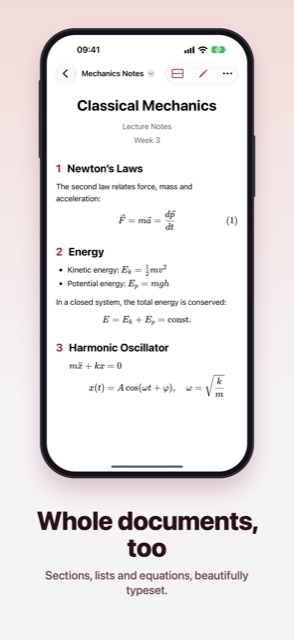
Put formulas in text with $…$, or write a whole document with \section, lists, tables and numbered equations – the preview typesets it beautifully, with title and sections. Your own \newcommand macros work too.

REAL .TEX FILES

Your formulas are plain .tex files in the Files app under “On My iPhone › Texlet”. Open .tex files from iCloud Drive or other apps and edit them right where they are. Copy the LaTeX code with one tap.

ORGANIZED YOUR WAY

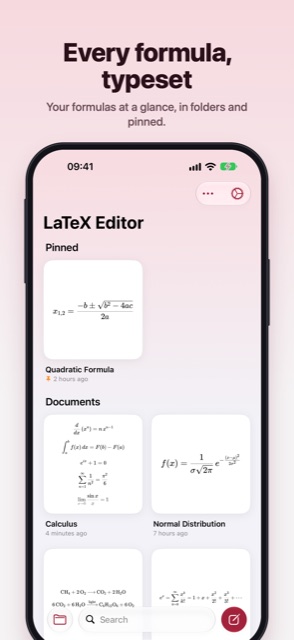
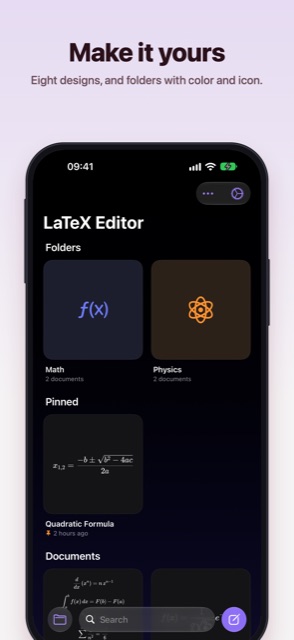
  • Every formula as a typeset thumbnail on the home screen
  • Folders with their own color and icon
  • Pin what matters, sort by date, name or your own order
  • Search, find and replace, printing and a LaTeX guide with examples

TEXLET PRO

For when you want more – as a monthly or yearly subscription:

Texlet is built by an independent developer. If you enjoy it, a rating means a lot!

  • No ads
  • Copy a formula as an image – sharp in Keynote, Pages, Notes and more
  • Export as PDF (vector) and PNG
  • iCloud sync between iPhone and iPad
  • Eight designs, from warm paper to deep black midnight
  • Widgets for your Home Screen and Lock Screen
  • Version history: bring back any earlier state
  • App lock and a private folder with Face ID

Texlet

Version 2.0 is here: rebuilt from scratch as a native app. With a live preview, building blocks above the keyboard, syntax highlighting and PDF and image export.

Download on the App Store

More apps

HowlNight app icon
Party game

HowlNight

Werewolf, Impostor & more

Seven party games for a night with friends – on a single phone. Werewolf with a real narrator voice, Impostor, Ticking Bomb and more.

Cardfox app icon
Learning

Cardfox

Scan words, remember them

New: vocabulary suggestions, AI memory aids, listening mode, Apple Watch and widgets. Cardfox turns any book page into flashcards – and helps you remember them.

Code Editor app icon
Developer tools

Code Editor

Websites & Scripts on the Go

New: an AI assistant with Claude, ChatGPT or Gemini that edits your project. Plus a live preview, a console, whole projects, offline Python and 20+ languages.

Python Editor app icon
Developer tools

Python Editor

Run Python 3 Code Offline

New in 2.0: Python runs right on your device – with numpy, matplotlib, turtle graphics, Jupyter notebooks, 20 examples and error hints in plain words.

Markdown Editor and Reader app icon
Writing

Markdown Editor and Reader

Write, preview and share .md

Version 2.0 is here: rebuilt from scratch as a native app. With syntax highlighting, a formatting bar, live preview, folders and export to PDF and HTML.

txt Editor app icon
Notes

txt Editor

Fast, distraction-free notes

Version 2.0 is here: completely rebuilt, lightning fast and more beautiful than ever. Now with folders, custom sorting, eight designs and a private folder with Face ID.

AdNumbers app icon
Business

AdNumbers

AdMob & AdSense Earnings

Your ad revenue at a glance: AdMob and AdSense in one app – with forecasts, a monthly goal, statistics and on-device AI analysis.

Owlvest app icon
Finance

Owlvest

Compound Interest & Portfolio

Rebuilt from the ground up for iOS: see your savings plan grow, reach your goal, plan your payout and track your real portfolio – right from your broker's CSV.