LIVE PREVIEW FOR WEB PAGES
Your HTML page shows up as you type – below the code on iPhone, next to it on iPad and Mac. CSS, JavaScript and images from the project load along, just like on a real web server. Full screen preview with one tap.
 JL Apps
Developer tools · for iPhone, iPad, Mac
Websites & Scripts on the Go
Write code on iPhone, iPad and Mac – and see what it does right away. Code Editor opens in an instant, with no account and no internet needed. For websites, scripts, homework, coding classes and every quick fix on the go.

Free · In-app purchases
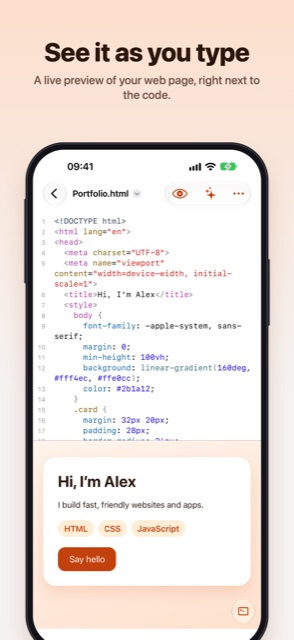
Your HTML page shows up as you type – below the code on iPhone, next to it on iPad and Mac. CSS, JavaScript and images from the project load along, just like on a real web server. Full screen preview with one tap.
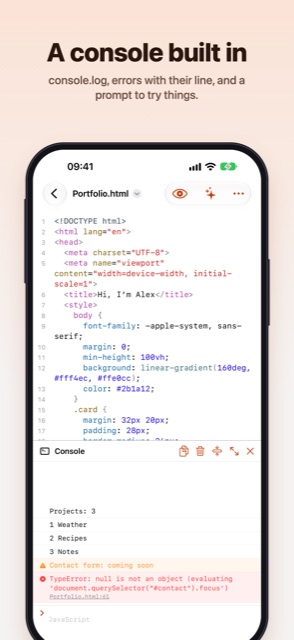
console.log, warnings and errors with their line number appear right below the preview. Tap an error to jump to its line. Try out JavaScript and Python in the prompt, with a history like a terminal.
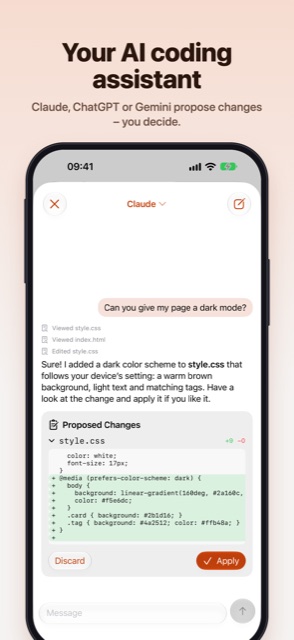
Ask Claude, ChatGPT or Gemini right next to your code: “Give my page a dark mode”, “Why doesn't the button work?”. The assistant reads your project's files and proposes changes. You see every change highlighted and decide whether to apply it – earlier states stay in the version history. Works with your own API key from Anthropic, OpenAI or Google; conversations are kept per project.
HTML, CSS, JavaScript, TypeScript, JSON, Markdown, Python, Swift, C, C++, Java, Kotlin, C#, Go, Rust, PHP, Ruby, SQL, YAML, XML and Shell – with syntax highlighting, line numbers and ⌘/ comments.
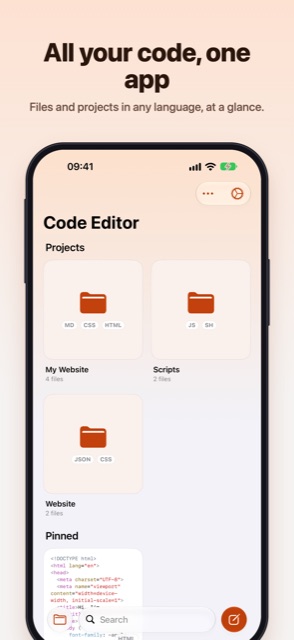
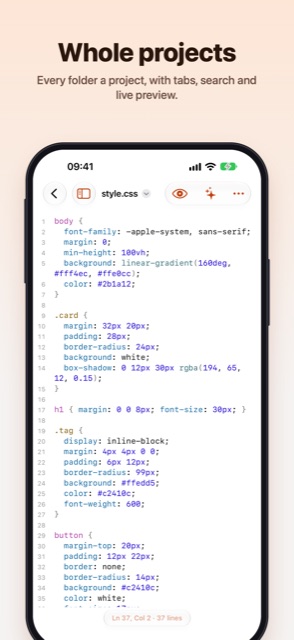
Every folder is a project: a file list, tabs, search across the project and go to file. Start with a ready-made website or an empty project, or open a folder from the Files app and iCloud Drive right where it is. A style sheet shows the page it styles, live.
Everything is a plain file in the Files app. Edit files from other apps right where they are. Cards on the home screen show each file's first lines in color, with pins and sorting.
With a menu bar, multiple windows and keyboard shortcuts – one subscription works on all your devices.
For when you want more – as a monthly or yearly subscription:
Code Editor is built by an independent developer. If you enjoy it, a rating means a lot!
New: an AI assistant with Claude, ChatGPT or Gemini that edits your project. Plus a live preview, a console, whole projects, offline Python and 20+ languages.

Werewolf, Impostor & more
Seven party games for a night with friends – on a single phone. Werewolf with a real narrator voice, Impostor, Ticking Bomb and more.

Scan words, remember them
New: vocabulary suggestions, AI memory aids, listening mode, Apple Watch and widgets. Cardfox turns any book page into flashcards – and helps you remember them.
Run Python 3 Code Offline
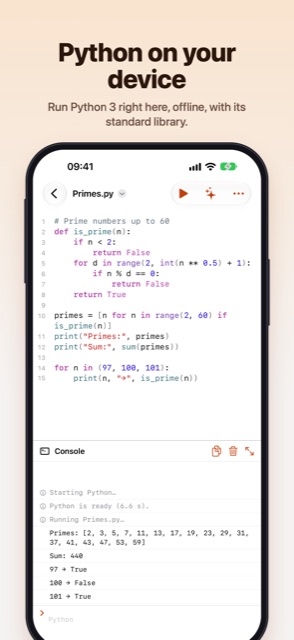
New in 2.0: Python runs right on your device – with numpy, matplotlib, turtle graphics, Jupyter notebooks, 20 examples and error hints in plain words.

Math, formulas & documents
Version 2.0 is here: rebuilt from scratch as a native app. With a live preview, building blocks above the keyboard, syntax highlighting and PDF and image export.
Write, preview and share .md
Version 2.0 is here: rebuilt from scratch as a native app. With syntax highlighting, a formatting bar, live preview, folders and export to PDF and HTML.
Fast, distraction-free notes
Version 2.0 is here: completely rebuilt, lightning fast and more beautiful than ever. Now with folders, custom sorting, eight designs and a private folder with Face ID.

AdMob & AdSense Earnings
Your ad revenue at a glance: AdMob and AdSense in one app – with forecasts, a monthly goal, statistics and on-device AI analysis.

Compound Interest & Portfolio
Rebuilt from the ground up for iOS: see your savings plan grow, reach your goal, plan your payout and track your real portfolio – right from your broker's CSV.